Funciones principales de este proyecto
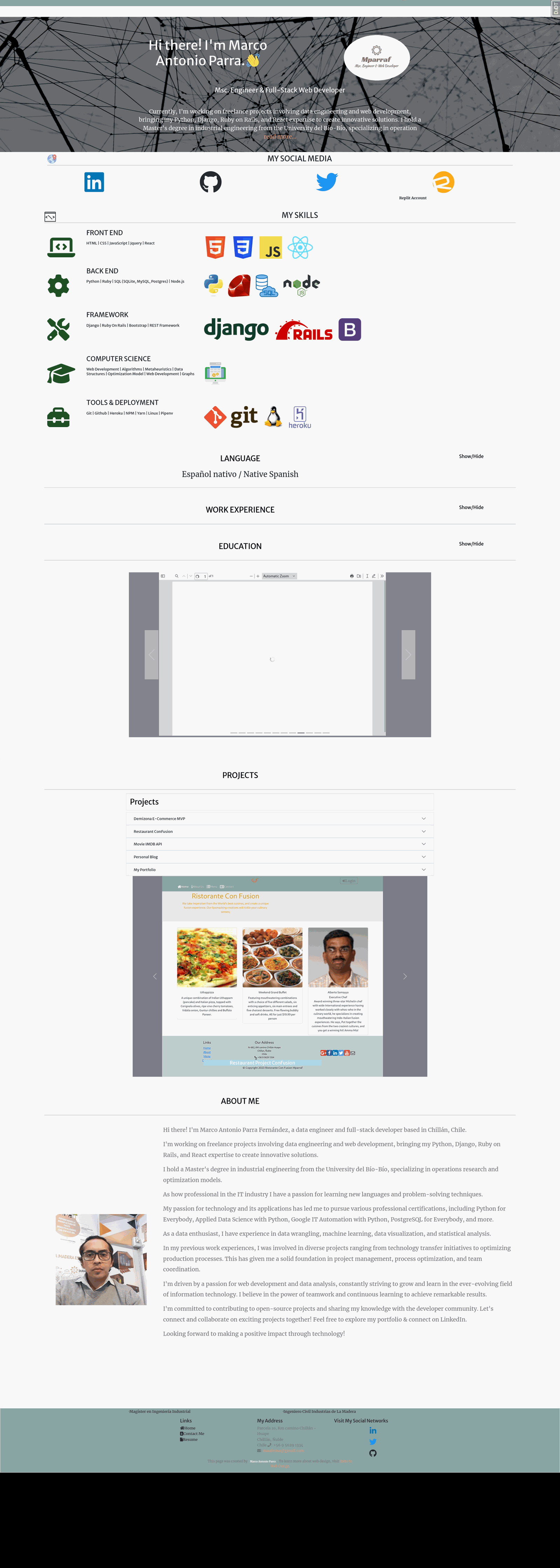
Marco Antonio Parra, Portfolio Page
Stack: Python Django HTML CSS SQL Postgres Linux Github Git JavaScript Heroku
Recopilación de la experiencia profesional, la formación académica, las especializaciones, las competencias de programación y los proyectos más relevantes en los que he participado. La aplicación web está construida en Python con el framework Django, con PostgreSQL como motor de base de datos y desplegada en Heroku.






Endpoints y rutas
Código de URLs del directorio del proyecto
from django.conf import settings
from django.conf.urls.i18n import i18n_patterns
from django.conf.urls.static import static
from django.contrib import admin
from django.contrib.sitemaps.views import sitemap
from django.urls import include, path

import blog.views
import mparraf.views
import portfolio.views
from portfolio.sitemaps import SITEMAPS

# Fuera del prefijo de idioma: admin, set_language, lo que Google lee en la raíz
# y las API (JSON no cambia de idioma, y una URL por idioma sería contenido duplicado).
urlpatterns = [
    path('admin/', admin.site.urls),
    # set_language: el POST del selector del navbar. Redirige a la misma página en el
    # idioma elegido, que desde sep 2026 significa poner o quitar /es/. Es una vista
    # propia sobre la de Django por la trampa de resolve() que explica su docstring.
    path('i18n/setlang/', mparraf.views.set_language, name='set_language'),
    path('sitemap.xml', sitemap, {'sitemaps': SITEMAPS}, name='sitemap'),
    path('robots.txt', portfolio.views.robots_txt, name='robots'),
    path(portfolio.views.GOOGLE_SITE_VERIFICATION, portfolio.views.google_site_verification),
    path("ip/", blog.views.get_ip),
    path('api/', include('BookListAPI.urls')),
    path('littlelemon/', include('LittleLemonAPI.urls')),
    *static(settings.STATIC_URL, document_root=settings.STATIC_ROOT),
]

# Páginas HTML: el inglés sigue en /x/ (prefix_default_language=False, así ningún
# enlace existente se rompe) y el español pasa a /es/x/. Hasta sep 2026 el idioma
# iba sólo en la cookie y las dos versiones vivían en la misma URL, así que Google
# indexaba una y el sitio en español era invisible en búsqueda (auditoría A-13).
# La cookie sigue mandando: LanguagePrefixRedirectMiddleware lleva al visitante en
# español a la URL con prefijo cuando llega sin él.
urlpatterns += i18n_patterns(
    path('', include('portfolio.urls')),
    path('blog/', include('blog.urls')),
    path("blog/post/<slug>/", blog.views.post_detail, name="blog-post-detail"),
    # restaurant/ se retiró de las URLs (sep 2026): publicaba el menú del
    # ejercicio de Meta con datos de Faker y precios negativos (-$14.654),
    # y los marcadores del enunciado en el HTML. No estaba enlazado desde
    # ninguna parte, pero era público e indexable, y el sitio es una vitrina
    # de postulación. La app sigue instalada y los datos intactos: para
    # recuperarla basta con volver a añadir esta línea.
    # path('restaurant/', include('restaurant.urls')),
    # Djoser (registro abierto por API en /auth/users/) y allauth (/accounts/signup/
    # sin verificación) se retiraron de las URLs en ago 2026: el sitio no ofrece
    # registro público. Las apps siguen instaladas hasta la limpieza de dependencias.
    path('movies/', include('movies_OMDb.urls')),
    path('digidesk/', include('digidesk_api.urls')),
    path('data-science/', include('dataScience.urls')),
    path('todo/', include('todo_app.urls')),
    path('registration/', include('registration.urls')),
    path('timetracker/', include('timetracker.urls')),
    prefix_default_language=False,
)

urlpatterns += static(settings.MEDIA_URL, document_root=settings.MEDIA_ROOT)
handler404 = 'portfolio.views.handler404'
Código de URLs del directorio de la aplicación
from django.conf import settings
from django.contrib.staticfiles.urls import staticfiles_urlpatterns
from django.urls import include, path
from django.views.generic import RedirectView

from . import views

urlpatterns = [
    # /home/ publicaba el ABOUT ME de 2023 --- titular obsoleto, prosa en
    # español dentro de la página inglesa y un acordeón de skills vacío ---.
    # La corrección de A-6a alcanzó '/' y no esta ruta, que no está en la
    # navegación. Se redirige en vez de borrarla: 404.html y las plantillas
    # de restaurant/ usan {% url 'home' %}, y así ningún enlace se rompe.
    path('home/', RedirectView.as_view(pattern_name='portfolio', permanent=True), name='home'),
    path('', views.homeportfolio, name='portfolio'),
    path('portfolio/parts', views.portfolio_parts, name='parts'),
    path('contact/', views.contact_view, name='contact_me'),
    path('education/', views.education, name='education'),
    path("specialization/<int:specialization_id>/details", views.specialization_details, name="detail_specialization"),
    path("bootcamp/<int:bootcamp_id>/details", views.bootcamp_details, name="detail_bootcamp"),
    path("projects/<int:project_id>/", views.projects_rendering, name="detail_projects"),
    path('resume/en', views.resume_en, name='resume_en'),
    path('resume/sp', views.resume_sp, name='resume_sp'),
    # Proxy endpoint for images
    path('courses-details', views.CourseDetailView.as_view()),
    path('certificates-details', views.CertificationDetailView.as_view()),
    path('institutions', views.InstitutionDetailView.as_view()),
    path('courses-details/<int:pk>', views.SingleCourseItemView.as_view()),
    path('certificates-details/<int:pk>', views.SingleCertificateItemView.as_view()),
    path('institutions/<int:pk>', views.SingleInstitutionItemView.as_view()),
]

urlpatterns += staticfiles_urlpatterns()

# django-debug-toolbar solo está instalada en settings.dev; la ruta tampoco debe existir en prod.
if settings.DEBUG and 'debug_toolbar' in settings.INSTALLED_APPS:
    urlpatterns += [path('__debug__/', include('debug_toolbar.urls'))]