PROJECT DETAILS
To Do List (Task Tracker)
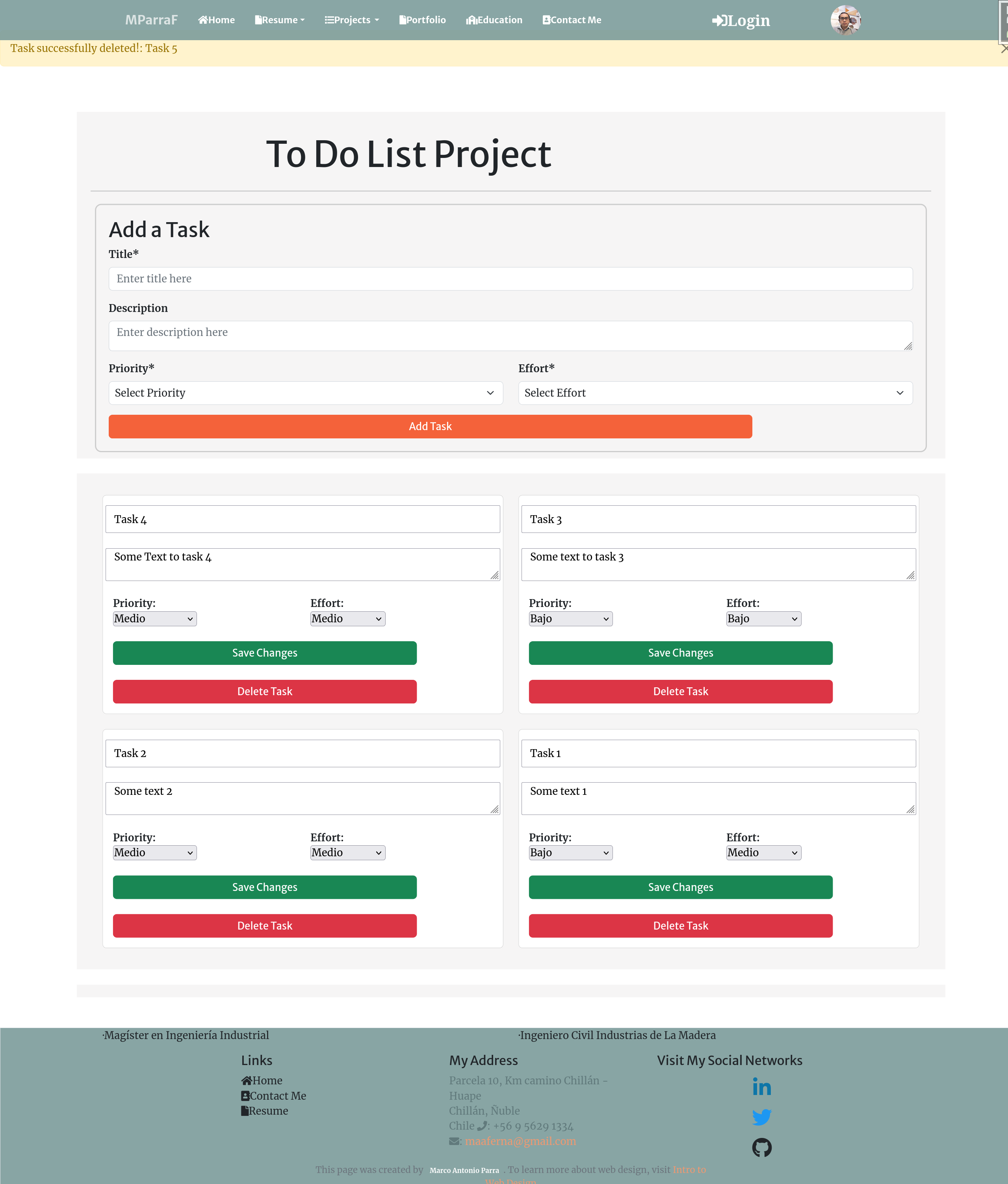
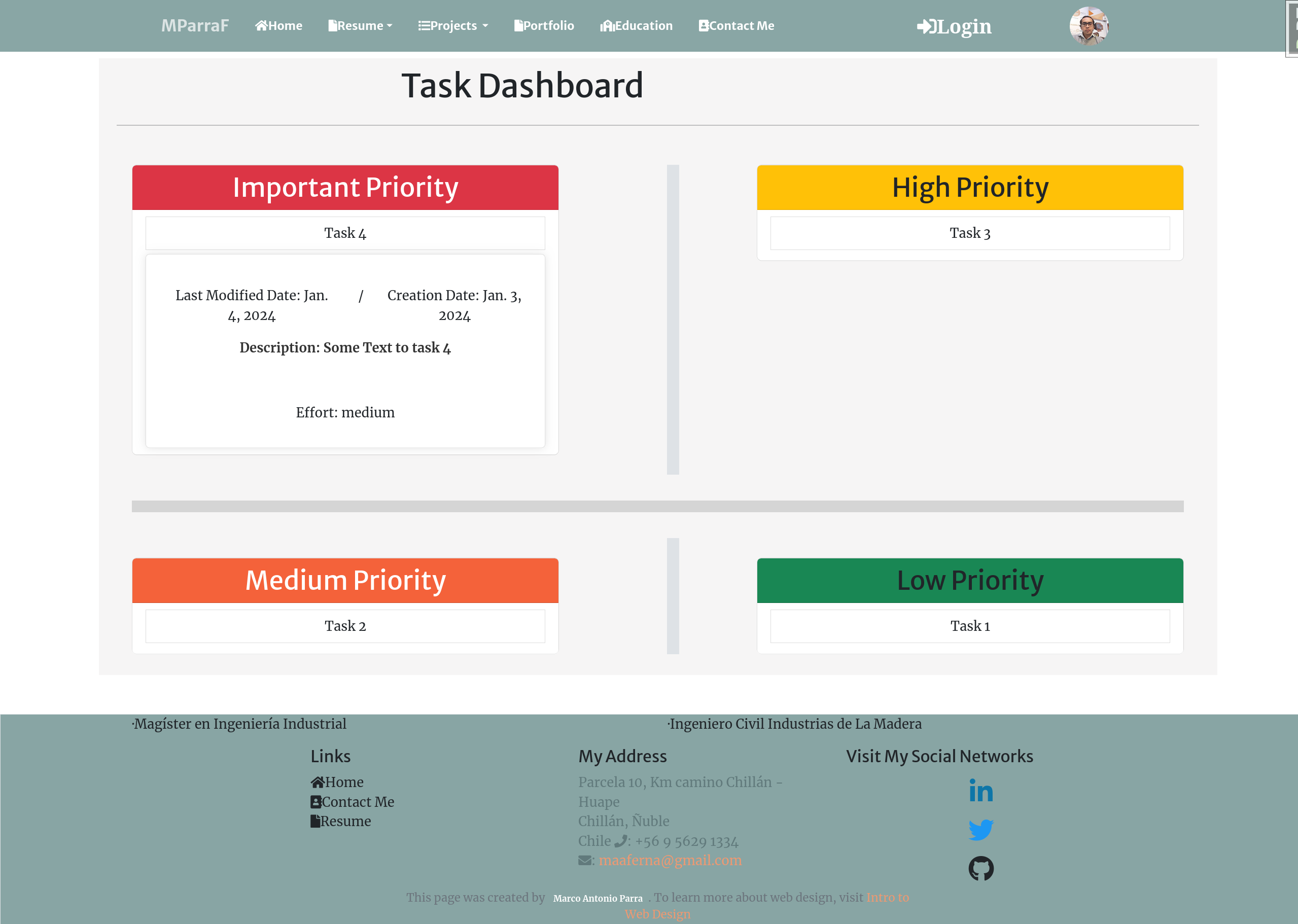
Task tracker embedded in this portfolio: each user keeps a private list of tasks with priority, effort, an optional due date and a completion state. A dashboard groups pending work by priority and flags overdue tasks.
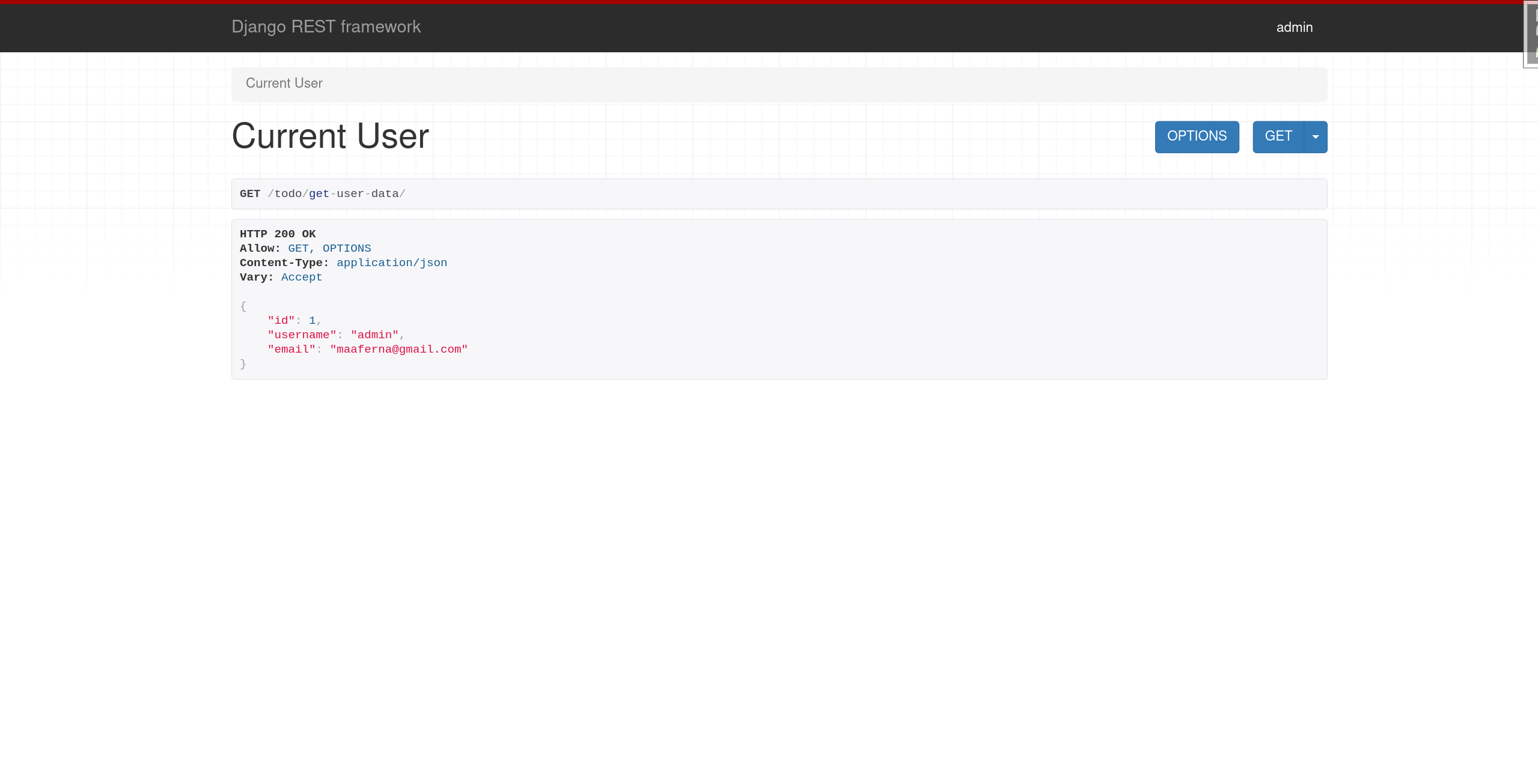
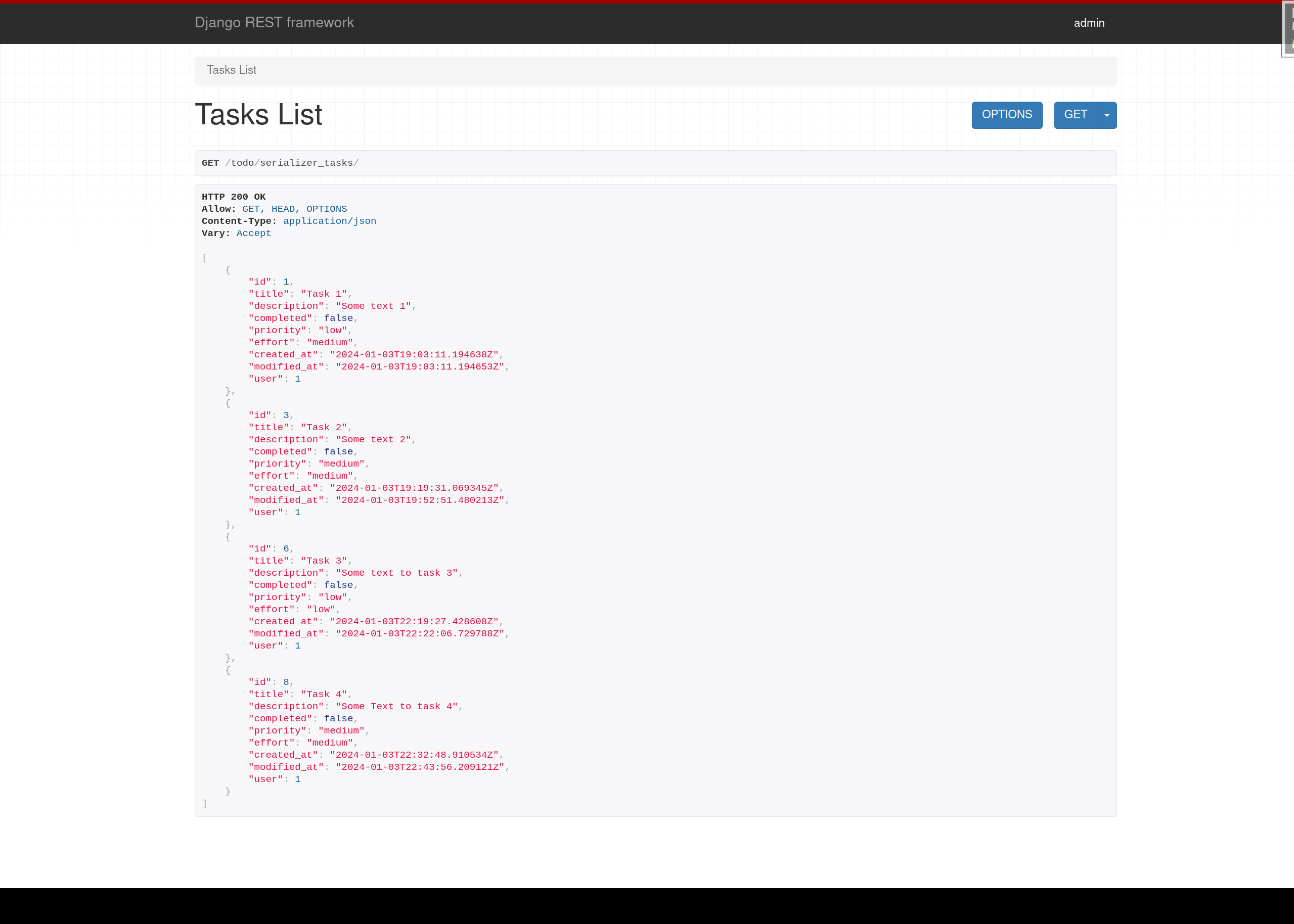
Built as a Django app with Django REST Framework: session-authenticated web views plus a JSON API restricted to tasks owned by the authenticated user (per-object ownership checks, POST-only deletes, CSRF protection).
Create, edit and delete tasks without page reloads (AJAX with jQuery) and try it instantly with the one-click demo account, which resets its tasks on every visit.
The original 2023 standalone version (Django REST + Djoser token auth + Vue.js frontend) is kept archived on GitHub for reference; the version deployed here is the actively maintained one.
Framework: Django

Technology Stack:
Backend: Django 5.2 / Django REST Framework / PostgreSQL
Frontend: Django templates / Bootstrap 5 / jQuery (AJAX)
Authentication: session-based, per-user task ownership
Demo: one-click demo account (todo/demo/)
About Team
Company / Institution: Freelance
Developer: Marco Antonio Parra
The running app is the todo_app module of this portfolio (Django + DRF, session auth, AJAX). The linked repository is the original 2023 standalone version (Django REST + Vue), kept archived for reference.
Project Images
Endpoints & Routes
Available EndPoints
Show Code
views.py Code
@throttle_classes([TenCallsPerMinute])
def projects_rendering(request, project_id):
    # Una ficha inexistente devolvía 500 (el .get() lanzaba DoesNotExist): 107 ids
    # sin proyecto servían la página desnuda de Django en vez del 404 del sitio.
    project = get_object_or_404(Project, id=project_id)
    projects = Project.objects.exclude(title_en='My Portfolio').exclude(status='archived')
    # image_logo admite NULL (blank=True, null=True) y os.path.basename(None) lanza
    # TypeError: una ficha creada en el admin sin logo devolvía 500. Sin logo, la
    # plantilla omite la <img>.
    logo = extract_filename_from_path(project.image_logo) if project.image_logo else ''

    # Galería y endpoints salen de datos, no de código: el prefijo del proyecto
    # (slug del repositorio, o el mapa de los proyectos antiguos) y lo que existe en
    # static/img y endpoints.json. Publicar un proyecto nuevo es crear la ficha en el
    # admin y dejar <slug>1.svg, <slug>2.svg… en static/img.
    prefix = gallery_prefix(project)
    with open(os.path.join(settings.STATICFILES_DIRS[0], 'json', 'endpoints.json')) as file:
        all_endpoints = json.load(file)
    # Sin prefijo, startswith('') aceptaría las rutas de todos los proyectos.
    endpoints = {key: value for key, value in all_endpoints.items() if prefix and key.startswith(prefix)}

    project.website = patch_url(project.website)
    project.repository = patch_url(project.repository)

    # Artículos del blog sobre este proyecto: uno por artículo, en el idioma activo si
    # existe (la misma regla que el listado del blog). Import local: blog ya depende de
    # portfolio (Post.project) y así no se forma un ciclo al cargar los módulos.
    from blog.models import pick_language
    related_posts = pick_language(
        project.posts.filter(published_at__lte=timezone.now()), get_language()
    )

    context = {
        'project': project,
        'projects': projects,
        'related_posts': related_posts,
        'path_images': gallery_images(project),
        'logo': logo,
        'endpoints': endpoints,
        'og_image_static': share_image(project),
        **show_code([projects_rendering], 'project.html'),
    }
    return render(request, 'project.html', context)
Template
{% extends 'base.html' %}
{% load i18n static %}
{# Título, descripción e imagen de la ficha: sin esto las diez fichas se compartían con el título genérico del sitio. #}
{% block title %}{{ project.title }} | Marco A. Parra F.{% endblock %}
{% block meta_description %}{{ project.description|striptags|truncatechars:160 }}{% endblock %}
{% block og_title %}{{ project.title }}{% endblock %}
{% block og_description %}{{ project.description|striptags|truncatechars:200 }}{% endblock %}
{% block og_image %}{% if og_image_static %}{{ request.scheme }}://{{ request.get_host }}{% static og_image_static %}{% else %}{{ block.super }}{% endif %}{% endblock %}
{% block twitter_card %}{% if og_image_static %}summary_large_image{% else %}summary{% endif %}{% endblock %}
{% block structured_data %}{{ block.super }}
<script type="application/ld+json">
{"@context": "https://schema.org", "@type": "SoftwareSourceCode", "name": "{{ project.title|escapejs }}", "description": "{{ project.description|striptags|truncatechars:300|escapejs }}", "url": "{{ canonical_url|escapejs }}",{% if project.repository %} "codeRepository": "{{ project.repository|escapejs }}",{% endif %} "programmingLanguage": "{{ project.technology|escapejs }}", "inLanguage": "{{ LANGUAGE_CODE }}", "author": {"@id": "{{ request.scheme }}://{{ request.get_host }}/#person"}}
</script>
{% endblock %}
{% block content %}
{% load static %}
{% load fontawesome_5 %}
{% load cached_pygments %}
<br><br>
<section class="container-section mb-4">
<div class="container-fluid">
<div class="row g-0">
<div class="portfolio-box-caption">
<div class="row">
<div class="col">
<h2 class="portfolio-box-headers" style="text-align:center">
{% trans "PROJECT DETAILS" %}</h2>
</div>
</div>
</div>
<hr>
<div class="container">
<div class="row" >
<div class="container-fluid specialization-detail" style="background: white">
<div class="row mb-4">
<h3 class="mt-9" style="margin:10px">{{ project.title }}</h3>
</div>
<hr>
<div class="row mb-4">
<p class="d-none d-sm-block show-read-more" style="margin:10px">{{ project.description|linebreaksbr }}</p>
</div>
<div class="row mb-4">
<div class="col-12 col-sm-10">
<h4>{% trans "Framework:" %} <strong> {{project.technology|linebreaksbr}}</strong></h4>
</div>
{% if logo %}
<div class="col">
<img class="mw-100" style="height: 3em" src="{% static 'img/' %}{{ logo }}" alt="{{project.title}}" />
</div>
{% endif %}
</div>
<div class="row mb-4">
<hr>
<h6>{% trans "Technology Stack:" %}</h6>
<p style="white-space: pre-wrap;">{{project.technology_stack|linebreaksbr}}</p>
<hr>
</div>
<div class="row mb-4">
<h4>{% trans "About Team" %}</h4>
<div class="row">
<div class="col-12 col-md-6">
<p><strong>Company / Institution: </strong>{{project.organizations}}</p>
</div>
<div class="col-12 col-md-6">
<p><strong>{% trans "Developer:" %} </strong>{{project.developers}}</p>
</div>
</div>
</div>
{% if project.website and project.website != 'Not Available' and project.website != '' %}
<div class="row mb-3">
{% if project.id == 4 or project.id == 9 %}
<div class="col-12 col-sm-6 mb-3 mb-sm-0">
<button class="btn btn-warning rounded-0"><a href="{{ project.website }}" target="_blank" style="font-size: 2em">Server Side Repo</a></button>
</div>
{% else %}
<div class="col-12 col-sm-6 mb-3 mb-sm-0">
<button class="btn btn-warning rounded-0"><a href="{{ project.website }}" target="_blank" style="font-size: 2em">{% trans "Go To Website" %}</a></button>
</div>
{% endif %}
{% if project.id != 2 %}
<div class="col-12 col-sm-6 mb-3 mb-sm-0">
<button class="btn btn-warning rounded-0"><a href="{{ project.repository }}" target="_blank" style="font-size: 2em">Go To Repository</a></button>
</div>
{% endif %}
</div>
{% endif %}
{% if project.id == 1 %}
<div class="row mb-3">
<div class="col-12">
<a class="btn btn-warning rounded-0" href="https://github.com/dekaacevedo/demizona/commits/master/?author=maaferna" target="_blank">
<i class="fab fa-github me-1"></i>My commits in this team project (57)
</a>
<p class="text-muted small mt-2 mb-0">
Team capstone with 6 contributors — the commit history filtered by my authorship
is publicly verifiable in the shared repository.
</p>
</div>
</div>
{% endif %}
{% if project.id == 9 or project.id == 42 or project.id == 75 %}
<div class="row mb-3">
<div class="col-12">
<a class="btn btn-warning rounded-0" href="{{ project.repository }}" target="_blank">
<i class="fab fa-github me-1"></i>Case study repository
</a>
<p class="text-muted small mt-2 mb-0">
The repository documents the problem, architecture and results of this case study.
Source code is not published{% if project.id != 9 %} (confidential, anonymized professional work){% endif %}.
</p>
</div>
</div>
{% elif project.id == 108 or project.id == 111 %}
{% comment %}
Case studies solo documentales sin demo (108 y control dimensional): el
bloque de arriba oculta los botones cuando no hay website.
La condición era «not project.website and project.repository», y capturaba
cualquier ficha sin sitio: la 1 (Demizona) publicaba «No source code is
published» sobre un repositorio de bootcamp que sí tiene código, y con el
botón apuntando al perfil de GitHub, no a un repo. Se enumeran los ids,
como hace la rama de arriba con 9/42/75.
{% endcomment %}
<div class="row mb-3">
<div class="col-12">
<a class="btn btn-warning rounded-0" href="{{ project.repository }}" target="_blank">
<i class="fab fa-github me-1"></i>{% trans "Case study repository" %}
</a>
<p class="text-muted small mt-2 mb-0">
{% trans "Documentation-only repository: problem, method, architecture and limits. No source code or client data is published." %}
</p>
</div>
</div>
{% elif project.repository and not project.website and project.id != 1 %}
{% comment %}
Cualquier ficha nueva sin demo: sin esta rama, la cadena por ids de arriba la
dejaba sin ningún enlace al repositorio. Texto neutro, sin afirmar que no hay
código; la 1 (Demizona) tiene su propio botón a los commits.
{% endcomment %}
<div class="row mb-3">
<div class="col-12">
<a class="btn btn-warning rounded-0" href="{{ project.repository }}" target="_blank">
<i class="fab fa-github me-1"></i>{% trans "Public repository" %}
</a>
</div>
</div>
{% endif %}
{% if project.id == 8 %}
<div class="row mb-3">
<div class="col-12">
<a class="btn btn-warning rounded-0" href="{% url 'todo_demo' %}">
<i class="fas fa-play me-1"></i>{% trans "Try the live demo (no account needed)" %}
</a>
<p class="text-muted small mt-2 mb-0">
{% trans "The running app is the <code>todo_app</code> module of this portfolio (Django + DRF, session auth, AJAX). The linked repository is the original 2023 standalone version (Django REST + Vue), kept archived for reference." %}
</p>
</div>
</div>
{% endif %}
{% if project.id == 2 %}
<div class="row mb-3">
<div class="col-12">
<a class="btn btn-warning rounded-0" href="{% url 'parts' %}">
<i class="fas fa-route me-1"></i>{% trans "Technical deep-dive: routes & endpoints" %}
</a>
</div>
</div>
{% endif %}
</div>
</div>
</div>
</div>
</div>
</section>
{% block certificates %}
{% include 'partials/carousel_images.html' %}
{% endblock %}
{# Artículos del blog sobre este proyecto (Post.project), en el idioma activo si existe. #}
{% if related_posts %}
{% get_current_language as CURRENT_LANGUAGE %}
<section class="container-section mb-4" id="related-articles">
<div class="container-fluid">
<div class="row g-0">
<div class="portfolio-box-caption">
<h2 class="portfolio-box-headers text-center">{% trans "Related articles" %}</h2>
</div>
<hr>
<div class="container mb-4">
<ul class="list-unstyled mb-0">
{% for post in related_posts %}
<li class="py-2 border-bottom">
<a href="{% url 'blog-post-detail' post.slug %}" class="fw-semibold">{{ post.title }}</a>
{% if post.language != CURRENT_LANGUAGE %}<span class="badge bg-secondary align-middle ms-1">{{ post.language|upper }}</span>{% endif %}
<p class="text-muted small mb-0">{{ post.summary|truncatewords:30 }}</p>
</li>
{% endfor %}
</ul>
</div>
</div>
</div>
</section>
{% endif %}
{# Sólo si endpoints.json tiene entradas para este proyecto: un caso de estudio o una CLI no tiene rutas HTTP, y la tabla vacía (fichas 9, 42 y 111) parecía un error. Antes se ocultaba por id, y cada ficha nueva la mostraba vacía. #}
{% if endpoints %}
<section class="container-section mb-4">
<div class="container-fluid">
<div class="row g-0">
<div class="portfolio-box-caption">
<div class="row">
<div class="col">
<h2 class="portfolio-box-headers" style="text-align:center">
<i class="fas fa-route"></i> {% trans "Endpoints & Routes" %}</h2>
</div>
</div>
</div>
<hr>
<div class="container mb-4" id="Endpoint">
<h3 class="mb-3 mt-4 p-4" style="background-color: #212529; color: #fff;"><i class="fas fa-list"> Available EndPoints</i></h3>
{% if project.id == 3 %}
<p>
In this project, only a few available endpoint is displayed, in the section <strong>Available EndPoint</strong> there are displayed. To see the complete code can visit the original repository.
</p>
{% endif %}
<div class="row">
<div class="col table-responsive">
<table class="table table-hover align-middle">
<thead class="table-dark">
<tr>
<th scope="col">{% trans "Endpoint" %}</th>
<th scope="col">{% trans "Description" %}</th>
<th scope="col">URL</th>
</tr>
</thead>
<tbody>
{% for key, values in endpoints.items %}
{% for items in endpoints.values %}
{% for value in items %}
<tr>
<td> {{ value.endpoint }}</td>
<td>{{ value.description|linebreaksbr }}</td>
<td>
<a class="btn btn-success btn-sm rounded-0" href="{{ value.href }}" target="_blank" rel="noopener" aria-label="{% trans "Open" %} {{ value.endpoint }}"><i class="fa fa-edit" aria-hidden="true"></i></a>
</td>
</tr>
{% endfor %}
{% endfor %}
{% endfor %}
</tbody>
</table>
</div>
</div>
</div>
</div>
</div>
</section>
{% endif %}
{% include 'partials/_show_code.html' %}
{% endblock %}